Insight

I gave my AI agents their own ID badges Dałem moim agentom AI własne identyfikatory

AI agents are starting to do real work — reading files, writing data, calling APIs. So who is the agent in your systems? I built a small private lab to find out: two agents, identical tasks, and identity as the only thing that separates them. Agenci AI zaczynają wykonywać prawdziwą pracę — czytają pliki, zapisują dane, wywołują API. Kim więc jest agent w Twoich systemach? Zbudowałem małe, prywatne laboratorium, żeby to sprawdzić: dwaj agenci, identyczne zadania, a tożsamość jako jedyne, co ich różni.

The setup

Two AI agents — reader-agent and writer-agent — run the exact same task list. The only difference between them is their identity.

The mechanism

Okta issues each a non-human identity; Workload Identity Federation trades it for short-lived Google Cloud credentials; least-privilege IAM does the rest.

The result

The identity layer — not the model behaving nicely — decides what each agent can do. The blast radius equals the permissions, no more.

AI agents are starting to do real work. They read files, write data, and call APIs. This is exciting, but it raises a simple question that we often skip:

Who is the agent in your systems?

If an agent logs in with a human account, or with a shared API key that never expires, you have a problem. You cannot limit what it can do. You cannot see what it did. And if the key leaks, the damage can be big.

I wanted to understand this topic better, so I built a small lab. It is not a product and it is not production-ready. It is a private learning project — I am not publishing the code — but in this article I want to walk you through what I built, how, and what I learned.

The idea

I created two AI agents: reader-agent and writer-agent. Both use Claude as their "brain". Both get exactly the same task list:

  • read a file from a Google Cloud Storage bucket
  • upload a file
  • delete a file
  • query a BigQuery table
  • insert a row and delete rows
  • read and append rows in a shared Google Sheet
  • read the project IAM policy (a task that is out of scope for both agents — on purpose)

The only difference between the two agents is their identity and the permissions attached to it. So if one agent succeeds and the other is denied, we know it is the identity layer doing the work — not the agent "being nice".

Before the steps — Terraform builds everything

Nothing in this lab was clicked together in a web console. Everything is code, in two independent Terraform modules, with the state stored in Terraform Cloud:

  • terraform/okta — the identity provider side. It creates the custom Authorization Server, the agent_role claim, and the two client_credentials applications. Okta is the source of truth for who the agents are.
  • terraform/gcp — the cloud side. It is one module, but I split its resources into two layers on purpose:
    • Identity layer (free, persistent): the Workload Identity Pool and provider, the two service accounts, and the IAM bindings that connect them. I apply this once and leave it running — it costs nothing.
    • Workload layer (billable, ephemeral): the GCS bucket, the BigQuery dataset and table, and the audit log sink. I create this layer only for a demo session (make up) and destroy it right after (make down).

Why Terraform, and why this split?

  • Reproducible. I can tear everything down and rebuild the exact same lab in minutes. No "I forgot which checkbox I clicked".
  • Reviewable. Every identity, every role, every binding is visible in a pull request. For an identity lab, that is half of the point: the permissions are the code.
  • Cost control. The identity of an agent is free to keep. The resources it works on are not. Separating the two means the lab costs almost nothing between sessions.

The repo at a glance

The repo is private, so let me give you the map instead. It is small on purpose:

ai-agent-identity-lab/
├── terraform/
│   ├── okta/            # identity provider: auth server, agent_role claim, two agent apps
│   └── gcp/             # identity.tf = WIF pool/provider, SAs, bindings (free, persistent)
│                        # workload.tf + audit.tf = bucket, BigQuery, audit sink (billable)
├── agent/
│   ├── common/          # the building blocks (see below)
│   ├── reader_agent.py  # entry point for reader-agent
│   ├── writer_agent.py  # entry point for writer-agent
│   ├── run_demo.py      # runs both agents through the same tasks, prints the matrix
│   ├── run_boundary.py  # the negative federation tests
│   └── tests/           # unit tests — they mock Okta/GCP/Claude, so no credentials needed
├── dashboard/           # a small live console: run the agents, watch the allow/deny matrix
├── docs/                # architecture, setup guides, cost-control notes
├── Makefile             # up / down / demo / boundary / rogue / test
└── .github/workflows/   # CI: terraform fmt+validate and pytest — no cloud credentials in CI

The part I care most about is the separation inside agent/common/:

  • claude_brain.py — talks to Claude and picks the next action. It never touches a credential.
  • okta_auth.py and gcp_wif.py — get the Okta token and exchange it through WIF. They never touch business logic.
  • actions.py — executes the chosen action against GCS or BigQuery. It never makes an authorization decision — it only reports what IAM said.

Each file can do exactly one dangerous thing, and no file can do two. It is the same least-privilege idea, applied to the code itself.

Step 1 — Create identities in Okta

Each agent gets its own non-human identity in Okta. Technically, each agent is an OAuth2 application that uses the client_credentials flow. This flow is made for machines — no human user, no password, no browser login.

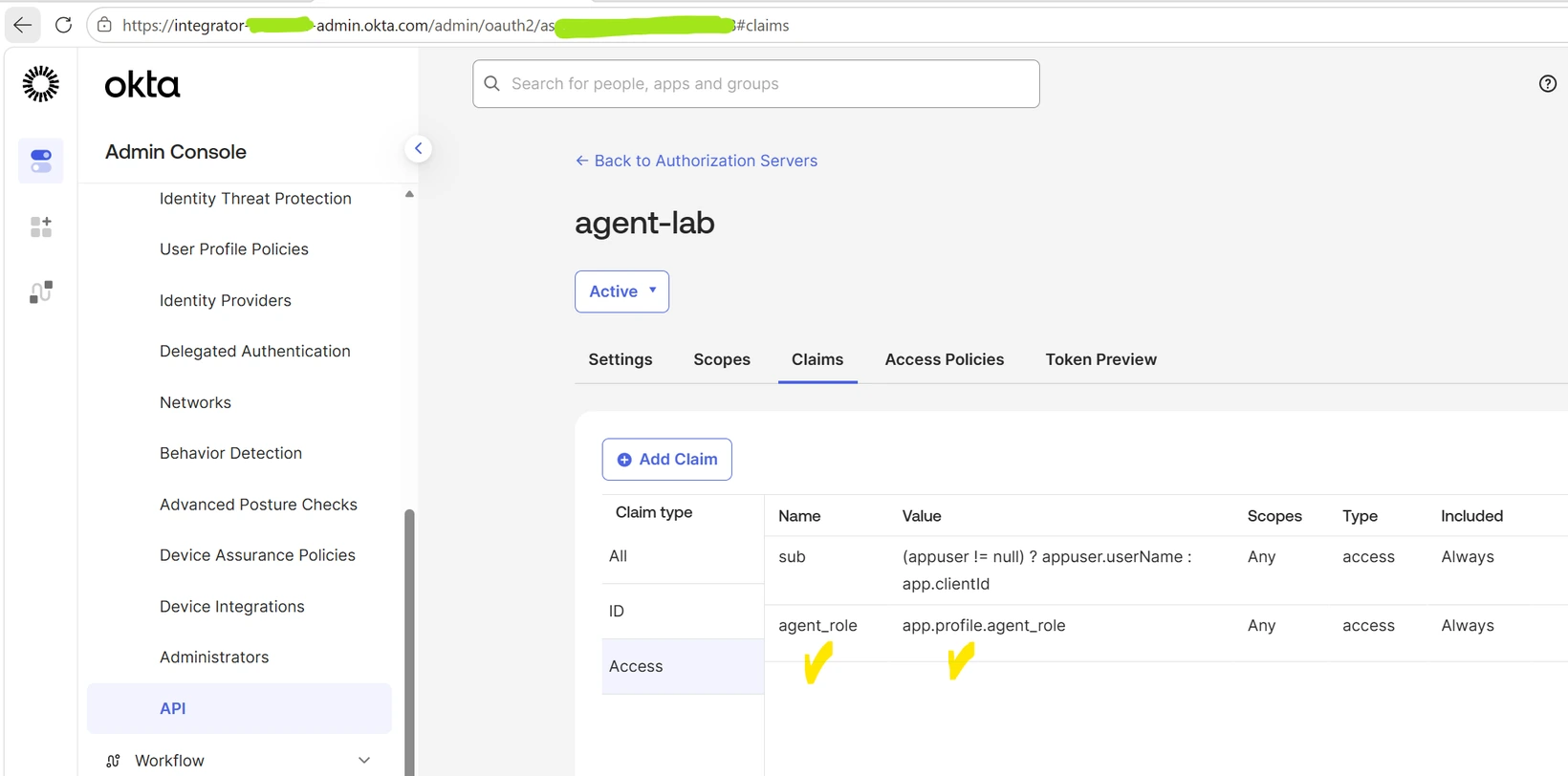
A custom Authorization Server in Okta adds one small but important thing to every token: a claim called agent_role, with the value reader or writer. This claim is the agent's "job title", and Google Cloud will read it later.

All of this lives in the terraform/okta module — the auth server, the claim, and the two apps are a few resource blocks. terraform apply builds the whole identity provider side in seconds, and terraform destroy rotates the client secrets if I ever want a clean start.
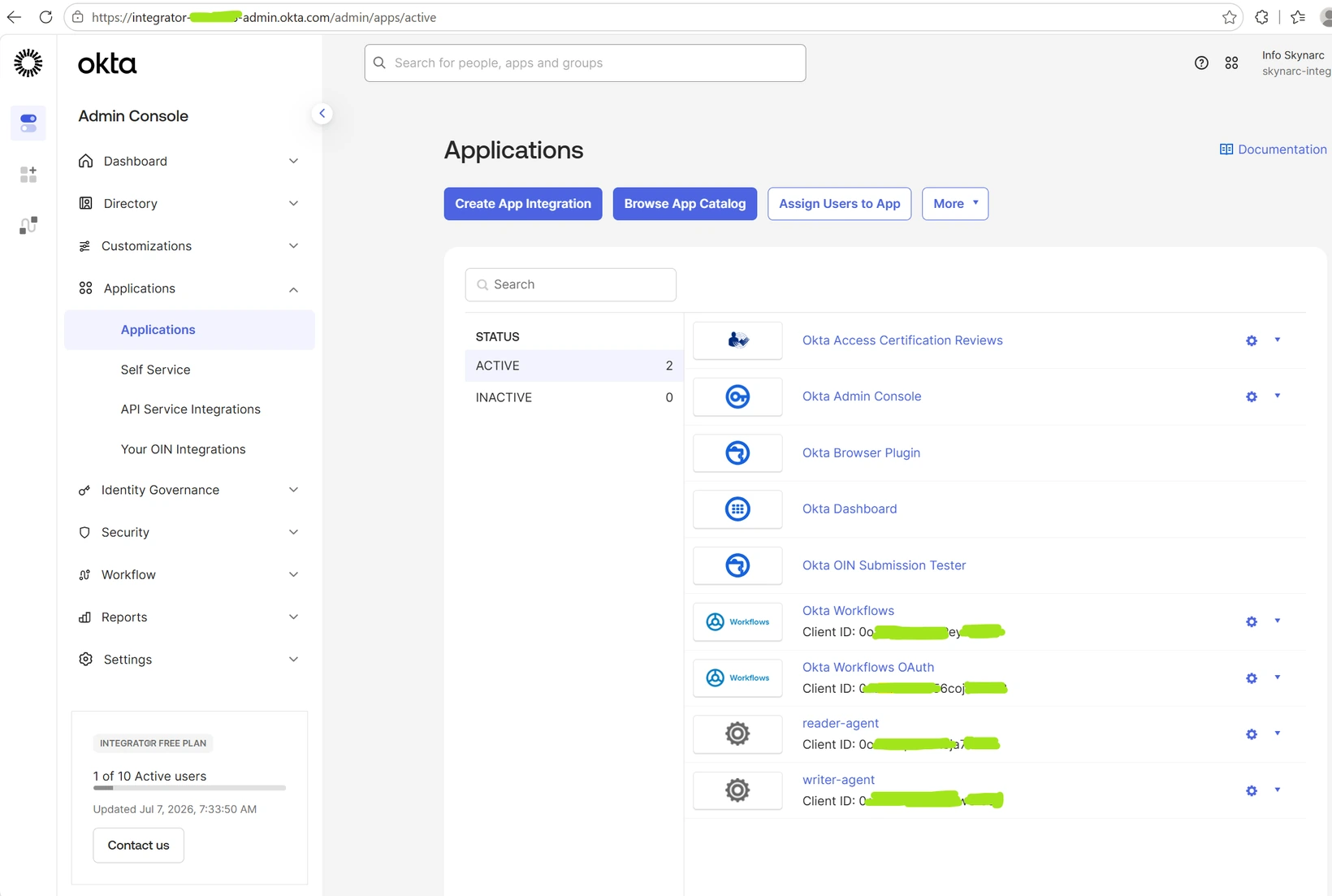
Okta Admin Console showing the reader-agent and writer-agent applications
Okta Admin Console → Applications: the reader-agent and writer-agent apps.
The Claims tab of the custom Authorization Server showing the agent_role claim
The custom agent-lab Authorization Server, Claims tab — the agent_role claim.

Step 2 — Federate into Google Cloud (no keys, ever)

I set one hard rule for this lab: no static service account keys. A JSON key file on disk is exactly the kind of secret that leaks.

Instead, I used Workload Identity Federation (WIF). It works like this:

  1. Google Cloud is configured to trust my Okta Authorization Server.
  2. The agent sends its Okta token (a JWT) to Google's Security Token Service.
  3. Google checks the token — the signature, the issuer, and the audience.
  4. If everything is correct, Google returns a short-lived token (about 1 hour).
  5. With that token, the agent impersonates its service account: sa-reader-agent or sa-writer-agent. Which one? Google decides by reading the agent_role claim.

All of this trust setup — the Workload Identity Pool, the Okta provider with its attribute mapping, the two service accounts, and the roles/iam.workloadIdentityUser bindings — is the free identity layer of the terraform/gcp module. It stays applied all the time, because an identity that costs nothing should not be created and destroyed like a temporary resource.

The result: nothing to store, nothing to rotate, and a small damage window if a token ever leaks. And one detail I like a lot: the LLM never sees any credential. The "brain" only picks the next action; a separate piece of Python code holds the federated credential and executes it.
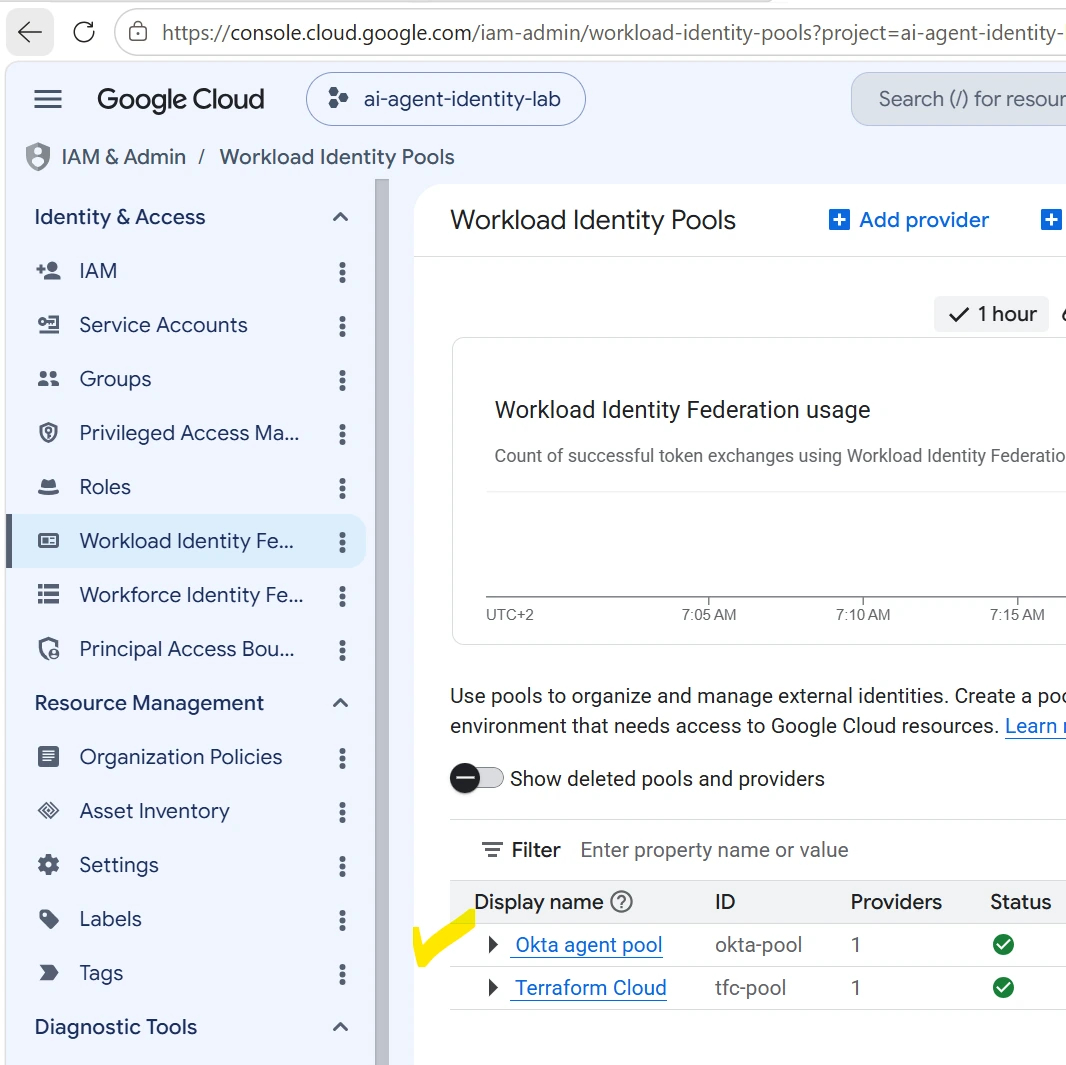
GCP Console showing the okta-pool under Workload Identity Federation
GCP Console → IAM & Admin → Workload Identity Federation: the okta-pool.
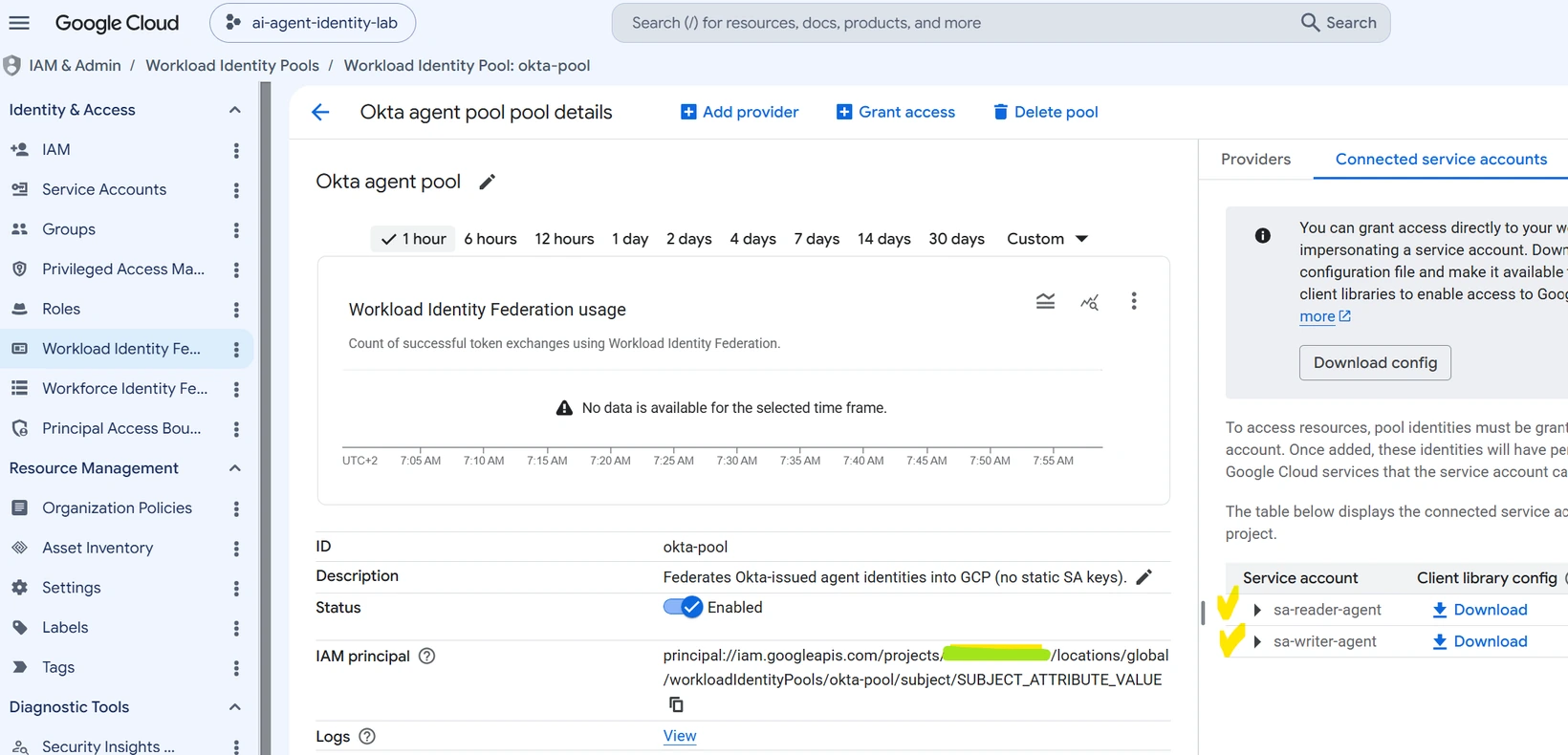
The okta-pool details page listing the two connected service accounts
The okta-pool details, with sa-reader-agent and sa-writer-agent as connected service accounts.

Step 3 — Assign permissions (least privilege)

Each service account gets only the roles it needs, and only on the exact resources — one bucket and one BigQuery dataset, not the whole project:

Role grantreader-agentwriter-agent
GCS bucketstorage.objectViewerstorage.objectAdmin
BigQuery datasetbigquery.dataViewerbigquery.dataEditor
Google SheetViewerEditor

The shared Google Sheet does not use IAM roles at all — it is simply shared with sa-reader-agent as Viewer and with sa-writer-agent as Editor. Same idea, a different permission system. Neither agent can read the project IAM policy; that task stays in the list anyway, because a good test also needs something that both agents must fail.
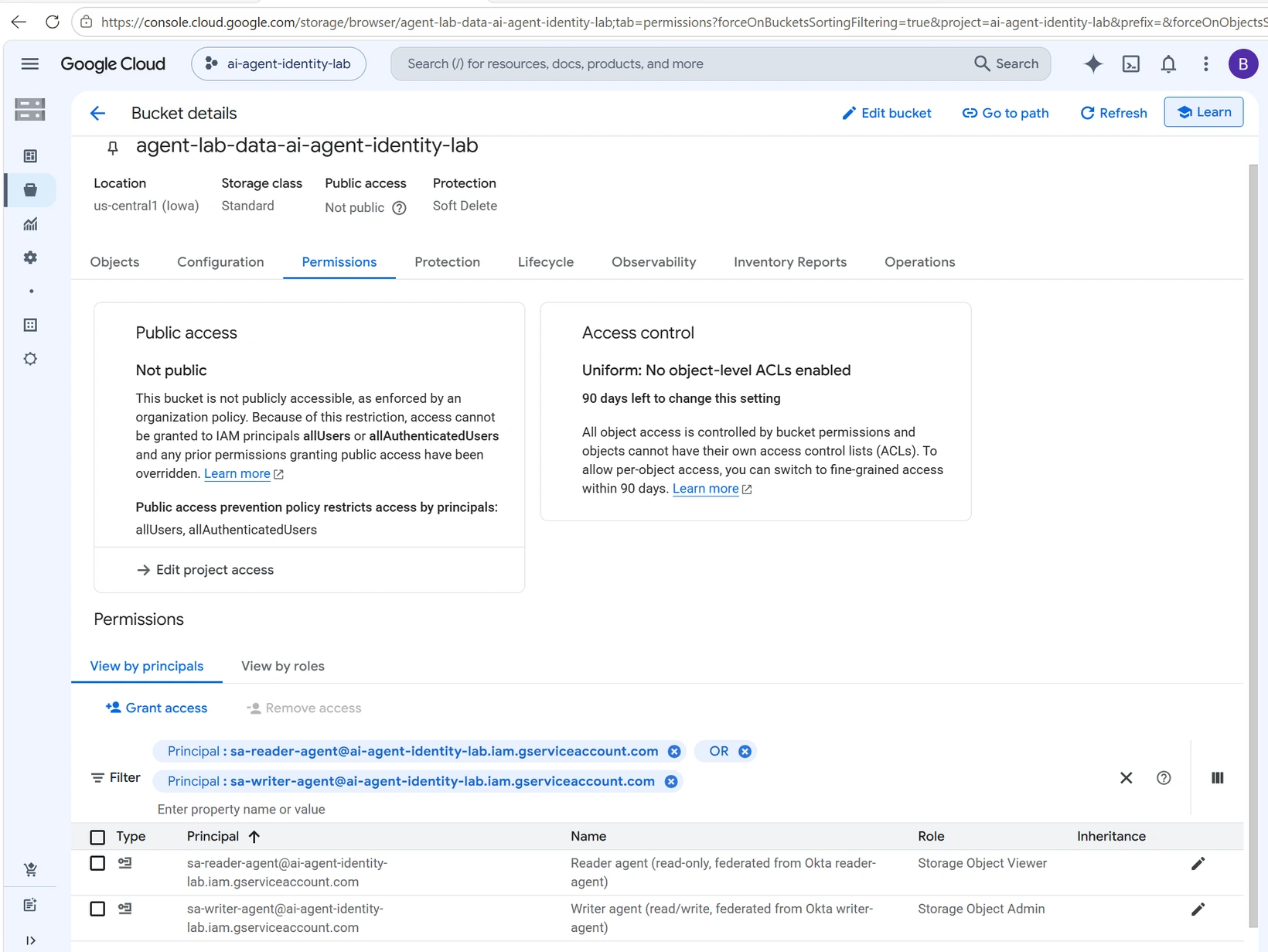
The bucket Permissions tab filtered to the two service accounts with different roles
The bucket's Permissions tab: Storage Object Viewer vs Storage Object Admin — and the bucket itself is Not public.

By the way, you do not have to trust the table above. You can ask BigQuery itself — this query lists the roles of both agents on the dataset, straight from INFORMATION_SCHEMA:

SELECT grantee, privilege_type, object_name, object_type
FROM `ai-agent-identity-lab.region-us.INFORMATION_SCHEMA.OBJECT_PRIVILEGES`
WHERE object_name = 'agent_lab'
  AND grantee LIKE '%-agent@%'
ORDER BY grantee;

It returns exactly two rows: sa-reader-agent with bigquery.dataViewer and sa-writer-agent with bigquery.dataEditor. Nothing more. I like this query because it turns "trust me, it is least privilege" into something you can check with SQL.
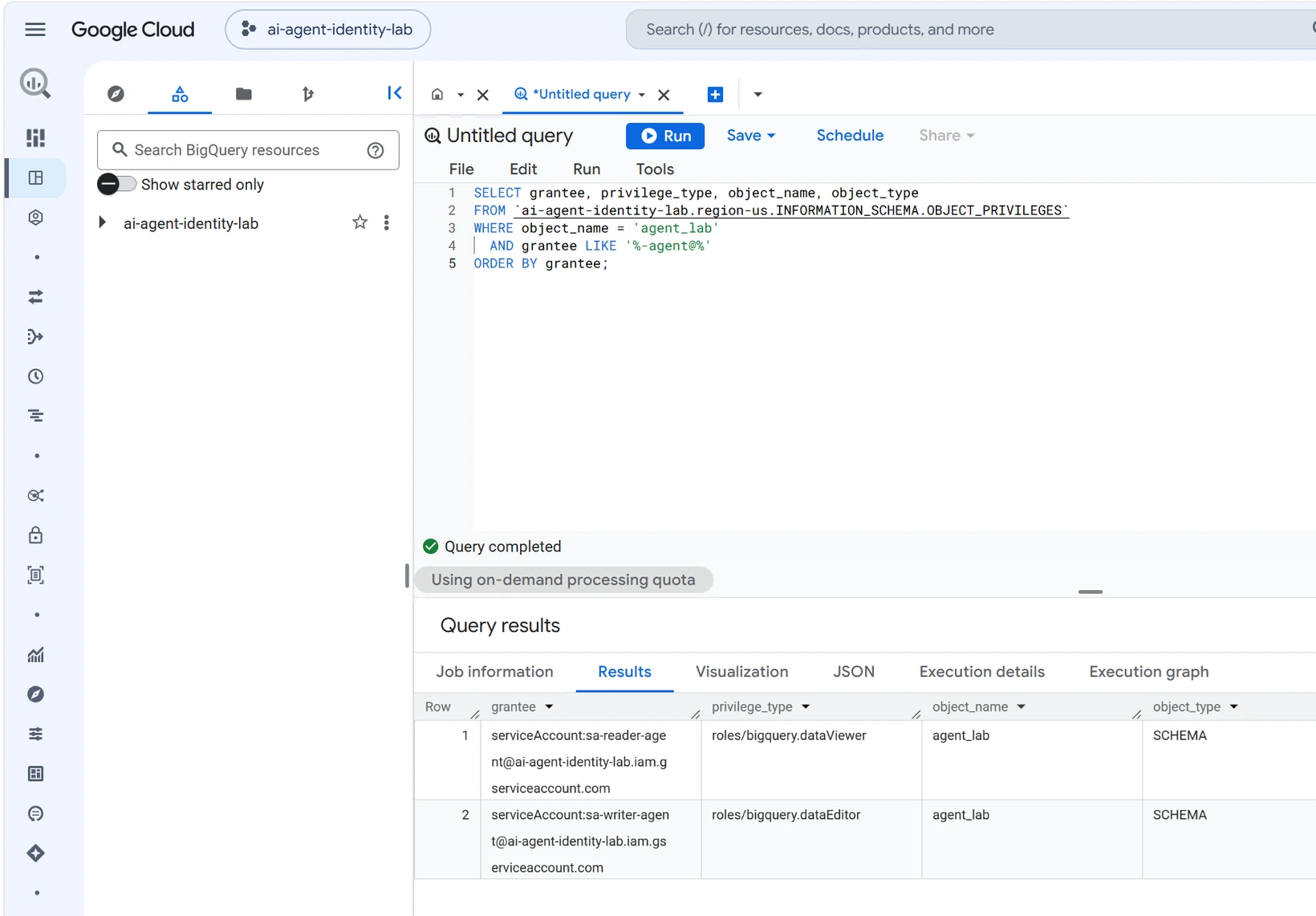
BigQuery console with the privileges query and its two-row result
BigQuery console with the query and its two-row result.

Step 4 — Test it

Both agents run the same task list, and the result is an allow/deny matrix. My code never makes an authorization decision — it only tries the action and reports what IAM said:

Taskreader-agentwriter-agent
gcs-readAllowAllow
gcs-writeDenyAllow
gcs-deleteMissAllow
bq-queryAllowAllow
bq-insertDenyAllow
bq-deleteDenyAllow
sheet-readAllowAllow
sheet-appendDenyAllow
iam-policyDenyDeny

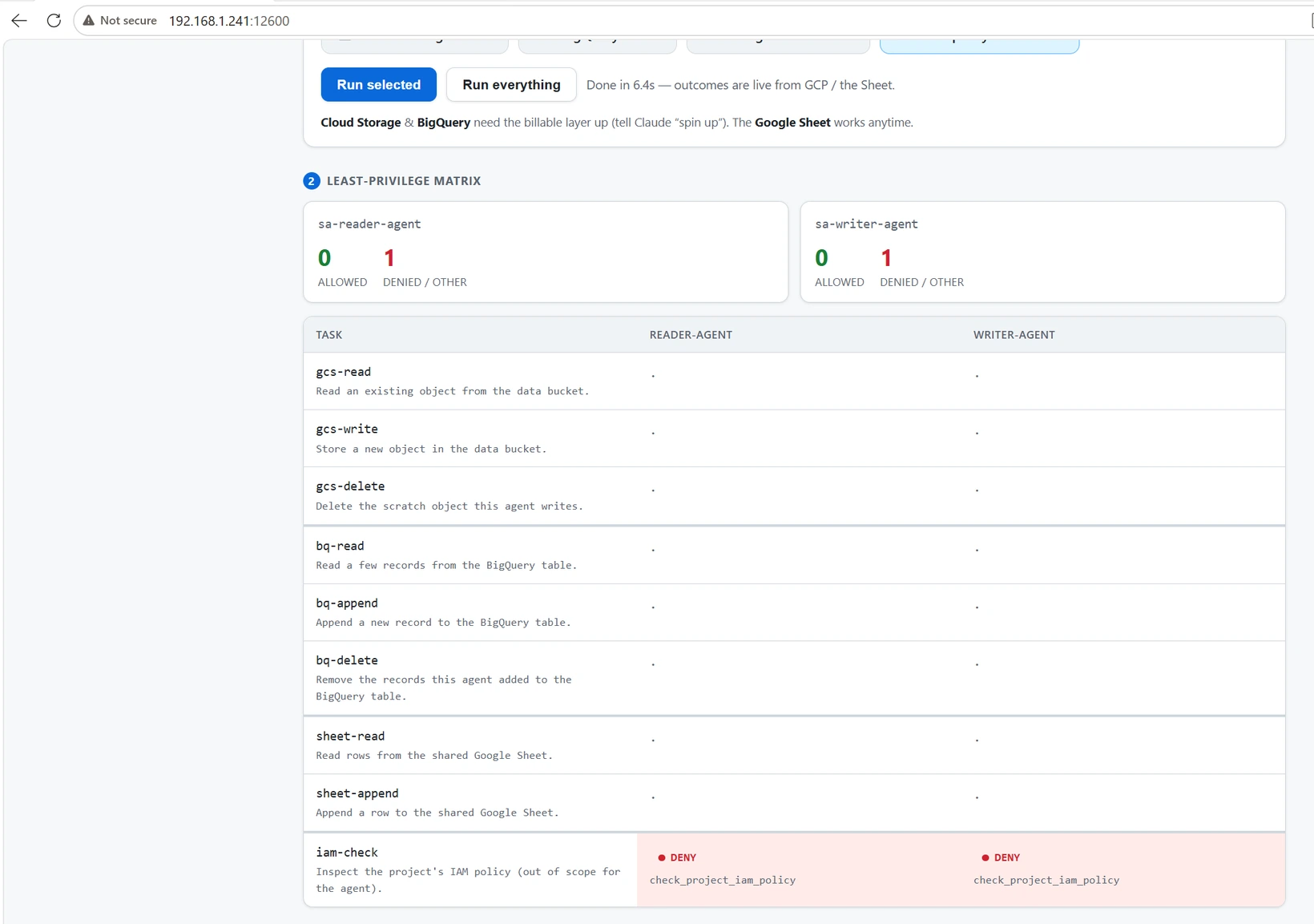
Reader reads; writer reads and writes; neither can touch the project IAM policy.

One honest detail in the matrix: reader's gcs-delete shows Miss, not Deny. Its write was denied one step earlier, so its scratch file never existed and there was nothing to delete. The denial happened where it should — at the write.

I also built a small live console, so I can trigger each target separately and watch the colors:
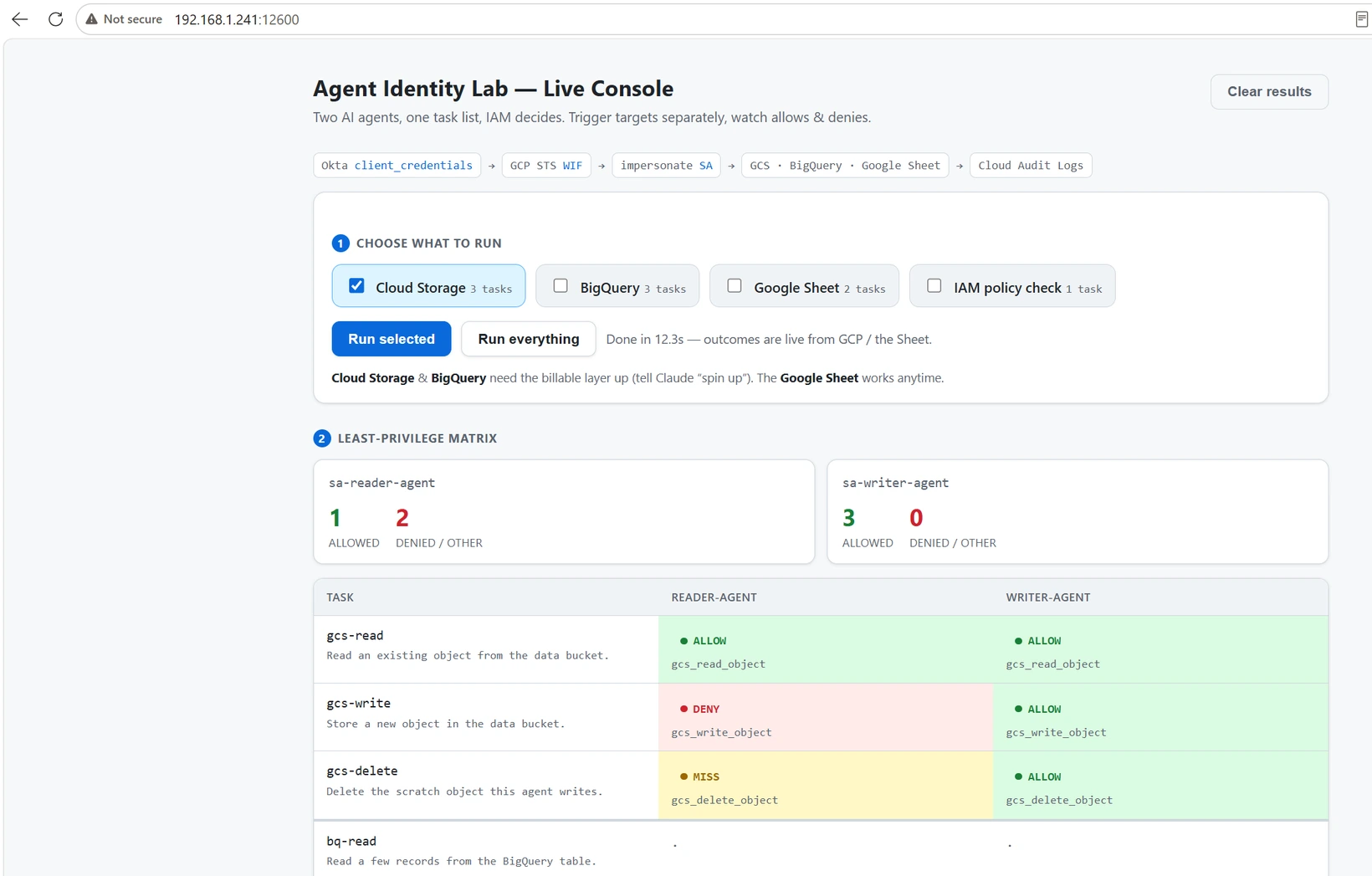
Live console showing the Cloud Storage allow/deny results
Live console — Cloud Storage.
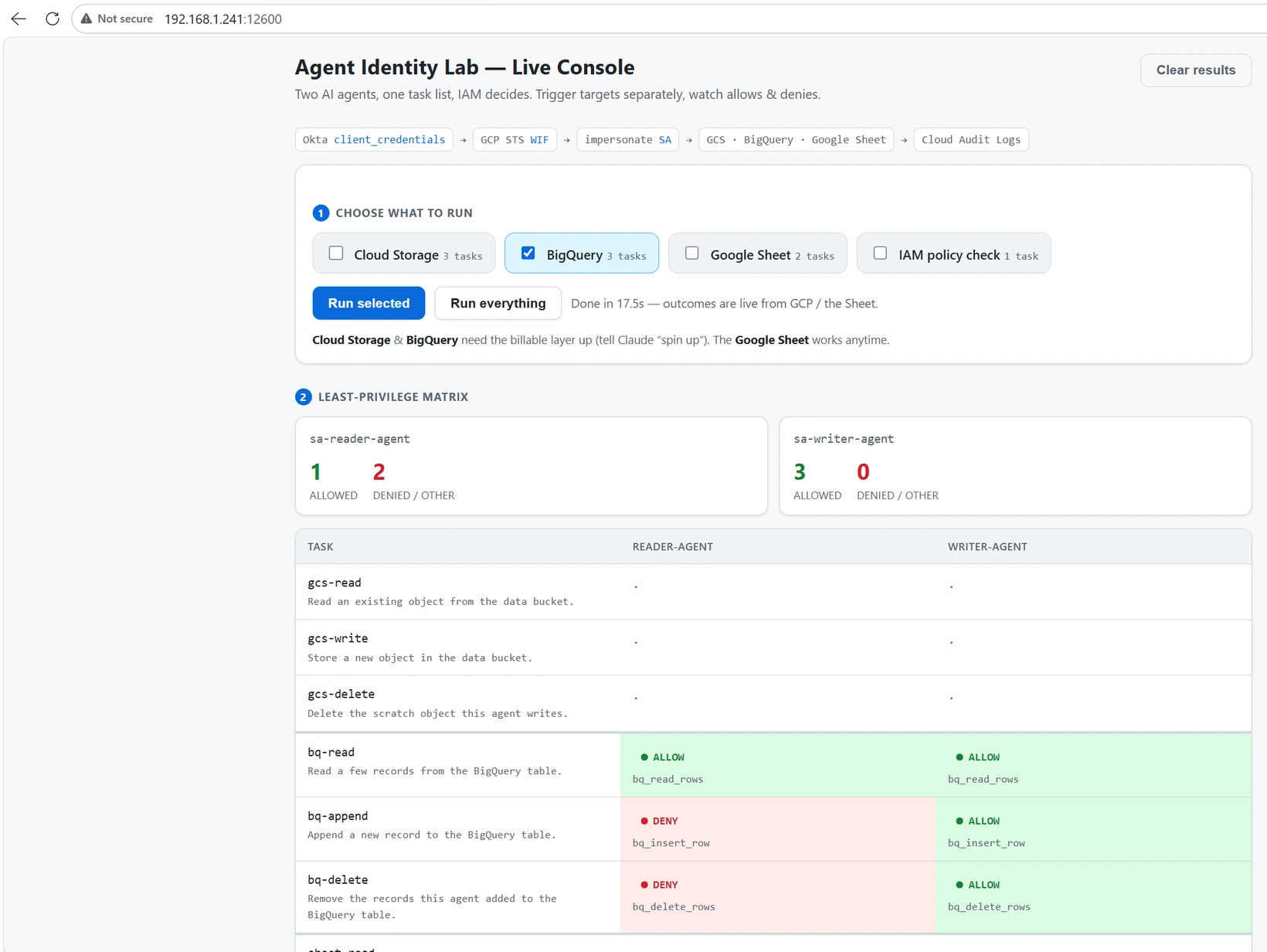
Live console showing the BigQuery allow/deny results
Live console — BigQuery.
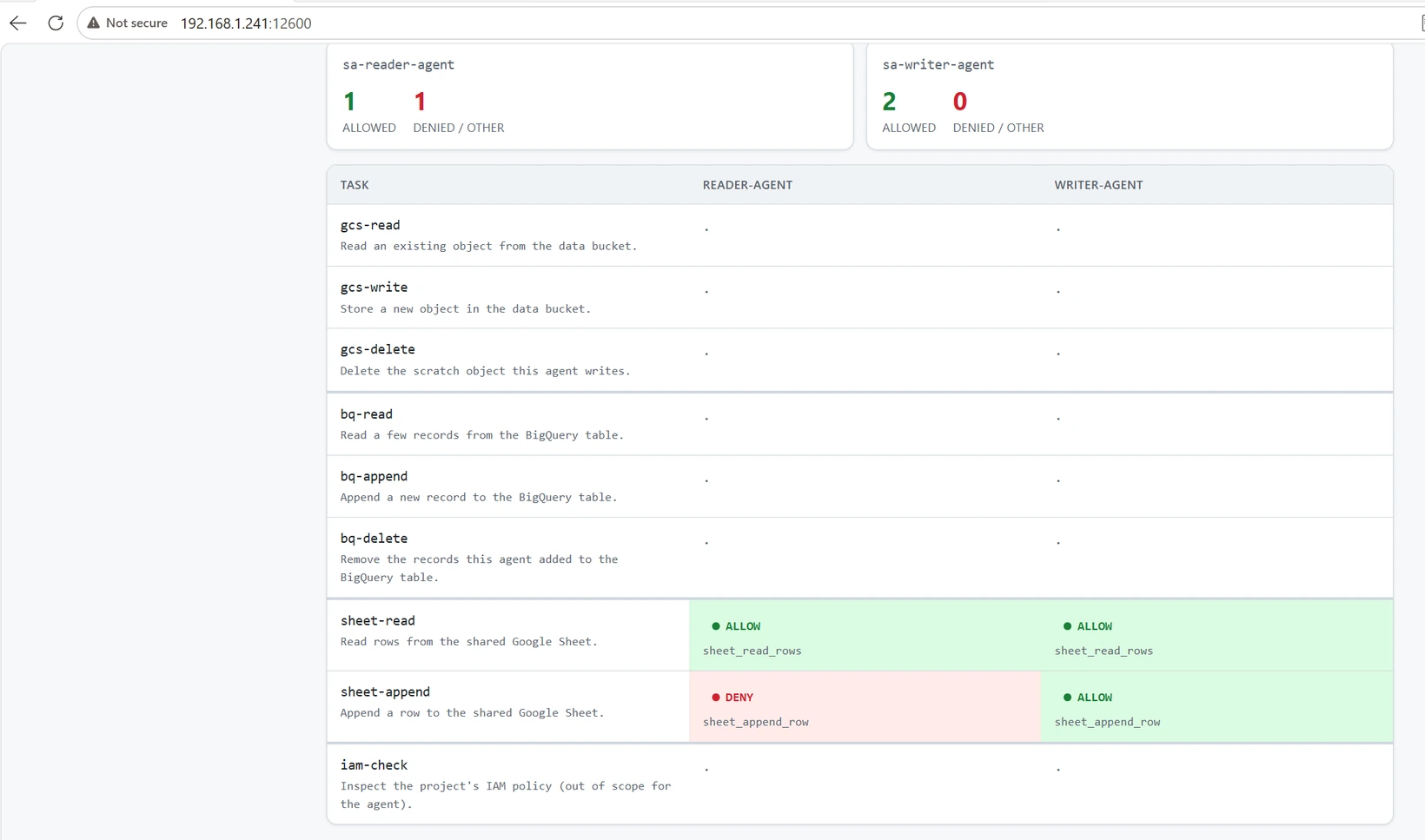
Live console showing the Google Sheet allow/deny results
Live console — Google Sheet.
Live console showing the IAM check denied for both agents
Live console — IAM check, denied for both agents.

I added tests that go beyond the happy path:

  • Boundary tests (make boundary) — things that must always be denied: a reader token trying to impersonate the writer's service account, a tampered JWT, and a token with the wrong audience. If any of these is allowed, the trust boundary is broken.
  • Rogue mode (make rogue) — I prompt the brain to pick the most destructive action it can, to simulate a compromised or prompt-injected agent. IAM still contains it. The blast radius stays exactly as big as the permissions — no bigger.
  • Audit trail — every action lands in Cloud Audit Logs and is exported to BigQuery, so I can see the same allow/deny story with a SQL query.
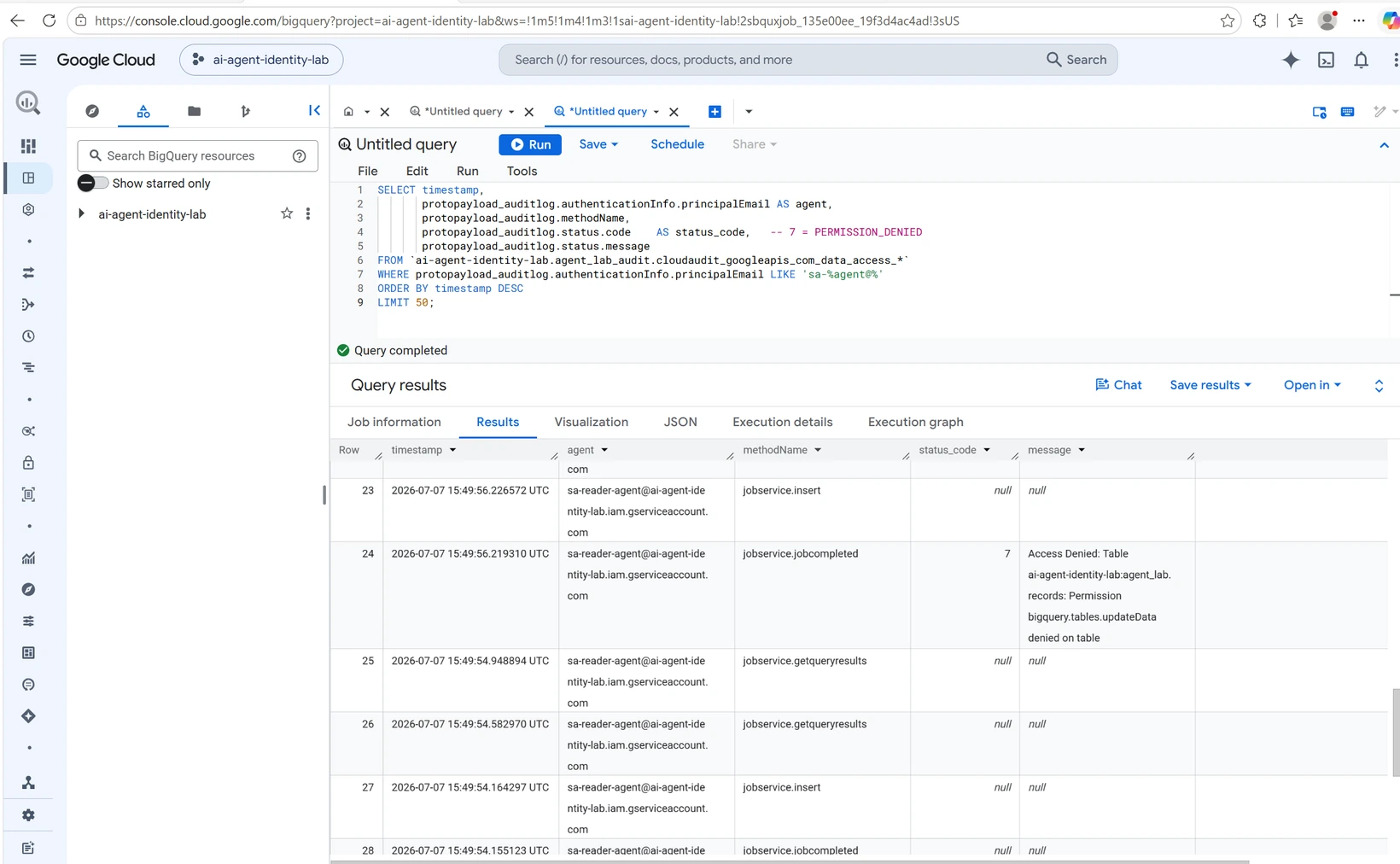
Audit query showing sa-reader-agent with status_code 7 PERMISSION_DENIED
The audit query: sa-reader-agent with status_code 7 (PERMISSION_DENIED), straight from Cloud Audit Logs.
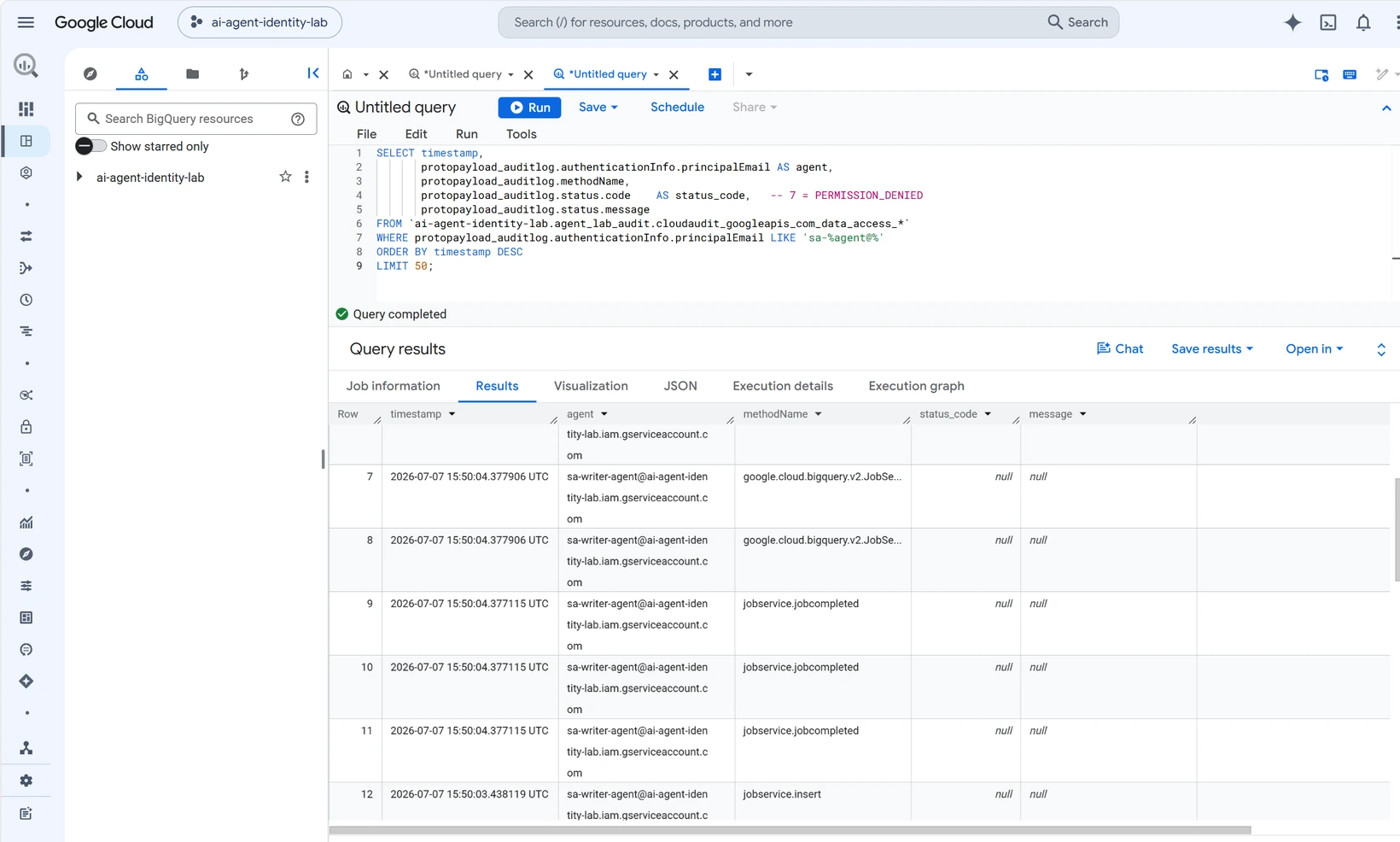
Audit query showing sa-writer-agent performing the same operations with no errors
For contrast: sa-writer-agent doing the same operations with no errors.

What I learned

  • Treat agents like employees. Own identity, own badge, and only the access needed for the job. "One shared key for all bots" is the same anti-pattern as a shared admin account.
  • Short-lived credentials beat key rotation. With federation, there is simply no key to rotate or to leak.
  • "The model behaves" is not a security control. Prompts can be injected and models can make mistakes. IAM does not care about any of that — and that is the point.
  • This lab does not prevent prompt injection. It only limits the blast radius when it happens. That is a smaller promise, but an honest one.

I am still learning in this space, and I am sure some of my choices can be improved. If you work on non-human identity, agent security, or workload federation, I would really like to hear your feedback — including the critical kind. The repo itself is private, but I am happy to discuss any part of the design.

—A Skynarc learning project on non-human identity.

Układ

Dwaj agenci AI — reader-agent i writer-agent — wykonują dokładnie tę samą listę zadań. Jedyna różnica między nimi to ich tożsamość.

Mechanizm

Okta wydaje każdemu nieludzką tożsamość; Workload Identity Federation wymienia ją na krótkotrwałe poświadczenia Google Cloud; least-privilege IAM robi resztę.

Wynik

O tym, co może każdy agent, decyduje warstwa tożsamości — a nie „grzeczność” modelu. Promień rażenia równa się uprawnieniom, nic więcej.

Agenci AI zaczynają wykonywać prawdziwą pracę. Czytają pliki, zapisują dane i wywołują API. To ekscytujące, ale rodzi proste pytanie, które często pomijamy:

Kim jest agent w Twoich systemach?

Jeśli agent loguje się kontem człowieka albo wspólnym kluczem API, który nigdy nie wygasa, masz problem. Nie możesz ograniczyć tego, co agent może zrobić. Nie widzisz, co zrobił. A jeśli klucz wycieknie, szkody mogą być duże.

Chciałem lepiej zrozumieć ten temat, więc zbudowałem małe laboratorium. To nie jest produkt i nie jest gotowe na produkcję. To prywatny projekt edukacyjny — nie publikuję kodu — ale w tym artykule chcę pokazać, co zbudowałem, jak, i czego się nauczyłem.

Pomysł

Stworzyłem dwóch agentów AI: reader-agent i writer-agent. Obaj używają Claude jako "mózgu". Obaj dostają dokładnie tę samą listę zadań:

  • odczytać plik z bucketa Google Cloud Storage
  • wgrać plik
  • usunąć plik
  • odpytać tabelę BigQuery
  • wstawić wiersz i usunąć wiersze
  • odczytać i dopisać wiersze we współdzielonym Arkuszu Google
  • odczytać politykę IAM projektu (zadanie poza zakresem obu agentów — celowo)

Jedyna różnica między agentami to ich tożsamość i przypisane do niej uprawnienia. Jeśli więc jednemu agentowi się uda, a drugi dostanie odmowę, wiemy, że to zasługa warstwy tożsamości — a nie tego, że agent "był grzeczny".

Zanim przejdziemy do kroków — wszystko buduje Terraform

Nic w tym laboratorium nie zostało wyklikane w konsoli webowej. Wszystko jest kodem, w dwóch niezależnych modułach Terraform, ze stanem przechowywanym w Terraform Cloud:

  • terraform/okta — strona dostawcy tożsamości. Tworzy niestandardowy Authorization Server, claim agent_role i dwie aplikacje client_credentials. Okta jest źródłem prawdy o tym, kim są agenci.
  • terraform/gcp — strona chmury. To jeden moduł, ale jego zasoby celowo podzieliłem na dwie warstwy:
    • Warstwa tożsamości (darmowa, trwała): Workload Identity Pool i provider, dwa konta serwisowe oraz łączące je powiązania IAM. Nakładam ją raz i zostawiam działającą — nic nie kosztuje.
    • Warstwa robocza (płatna, tymczasowa): bucket GCS, dataset i tabela BigQuery oraz sink logów audytowych. Tę warstwę tworzę tylko na sesję demo (make up) i zaraz po niej niszczę (make down).

Dlaczego Terraform i dlaczego taki podział?

  • Powtarzalność. Mogę wszystko zburzyć i odbudować dokładnie to samo laboratorium w kilka minut. Żadnego "nie pamiętam, który checkbox kliknąłem".
  • Przejrzystość. Każda tożsamość, każda rola i każde powiązanie są widoczne w pull requeście. W laboratorium o tożsamości to połowa sensu: uprawnienia kodem.
  • Kontrola kosztów. Utrzymanie tożsamości agenta jest darmowe. Zasoby, na których pracuje — już nie. Rozdzielenie tych dwóch rzeczy sprawia, że między sesjami laboratorium nie kosztuje prawie nic.

Repozytorium w pigułce

Repozytorium jest prywatne, więc zamiast linku dam Wam mapę. Jest celowo małe:

ai-agent-identity-lab/
├── terraform/
│   ├── okta/            # dostawca tożsamości: auth server, claim agent_role, dwie aplikacje
│   └── gcp/             # identity.tf = pula WIF/provider, konta serwisowe, powiązania (darmowe, trwałe)
│                        # workload.tf + audit.tf = bucket, BigQuery, sink audytowy (płatne)
├── agent/
│   ├── common/          # klocki, z których składają się agenci (poniżej)
│   ├── reader_agent.py  # punkt wejścia agenta reader-agent
│   ├── writer_agent.py  # punkt wejścia agenta writer-agent
│   ├── run_demo.py      # przepuszcza obu agentów przez te same zadania, drukuje macierz
│   ├── run_boundary.py  # negatywne testy federacji
│   └── tests/           # testy jednostkowe — mockują Okta/GCP/Claude, nie wymagają poświadczeń
├── dashboard/           # mała konsola na żywo: uruchom agentów, obserwuj macierz allow/deny
├── docs/                # architektura, przewodniki konfiguracji, notatki o kosztach
├── Makefile             # up / down / demo / boundary / rogue / test
└── .github/workflows/   # CI: terraform fmt+validate i pytest — bez poświadczeń chmurowych w CI

Częścią, na której zależy mi najbardziej, jest podział wewnątrz agent/common/:

  • claude_brain.py — rozmawia z Claude i wybiera następną akcję. Nigdy nie dotyka poświadczeń.
  • okta_auth.py i gcp_wif.py — pobierają token z Okta i wymieniają go przez WIF. Nigdy nie dotykają logiki biznesowej.
  • actions.py — wykonuje wybraną akcję na GCS lub BigQuery. Nigdy nie podejmuje decyzji autoryzacyjnej — tylko raportuje, co powiedział IAM.

Każdy plik może zrobić dokładnie jedną niebezpieczną rzecz i żaden nie może zrobić dwóch. To ta sama idea least privilege, zastosowana do samego kodu.

Krok 1 — Tworzenie tożsamości w Okta

Każdy agent dostaje własną nieludzką (non-human) tożsamość w Okta. Technicznie każdy agent to aplikacja OAuth2 używająca przepływu client_credentials. Ten przepływ jest stworzony dla maszyn — bez użytkownika, bez hasła, bez logowania w przeglądarce.

Niestandardowy Authorization Server w Okta dodaje do każdego tokena jedną małą, ale ważną rzecz: claim o nazwie agent_role z wartością reader lub writer. Ten claim to "stanowisko" agenta — Google Cloud odczyta go później.

Wszystko to mieszka w module terraform/okta — auth server, claim i dwie aplikacje to kilka bloków zasobów. terraform apply buduje całą stronę dostawcy tożsamości w kilka sekund, a terraform destroy rotuje sekrety klientów, gdybym kiedyś chciał zacząć od czysta.

Konsola administracyjna Okta z aplikacjami reader-agent i writer-agent
Konsola administracyjna Okta → Applications: aplikacje reader-agent i writer-agent.
Zakładka Claims niestandardowego Authorization Servera z claimem agent_role
Niestandardowy Authorization Server agent-lab, zakładka Claims — claim agent_role.

Krok 2 — Federacja do Google Cloud (bez kluczy, nigdy)

Ustaliłem jedną twardą zasadę dla tego laboratorium: żadnych statycznych kluczy kont serwisowych. Plik JSON z kluczem na dysku to dokładnie ten rodzaj sekretu, który wycieka.

Zamiast tego użyłem Workload Identity Federation (WIF). Działa to tak:

  1. Google Cloud jest skonfigurowany tak, aby ufać mojemu Authorization Serverowi w Okta.
  2. Agent wysyła swój token z Okta (JWT) do Security Token Service Google'a.
  3. Google sprawdza token — podpis, wystawcę (issuer) i odbiorcę (audience).
  4. Jeśli wszystko się zgadza, Google zwraca krótkotrwały token (około 1 godziny).
  5. Tym tokenem agent wciela się (impersonation) w swoje konto serwisowe: sa-reader-agent lub sa-writer-agent. Które? Google decyduje, czytając claim agent_role.

Cała ta konfiguracja zaufania — Workload Identity Pool, provider Okta z mapowaniem atrybutów, dwa konta serwisowe i powiązania roles/iam.workloadIdentityUser — to darmowa warstwa tożsamości modułu terraform/gcp. Pozostaje nałożona cały czas, bo tożsamości, która nic nie kosztuje, nie powinno się tworzyć i niszczyć jak zasobu tymczasowego.

Efekt: nie ma czego przechowywać, nie ma czego rotować, a jeśli token kiedyś wycieknie, okno szkód jest małe. I jeden szczegół, który bardzo mi się podoba: LLM nigdy nie widzi żadnych poświadczeń. "Mózg" tylko wybiera następną akcję; osobny kod w Pythonie trzyma federacyjne poświadczenie i je wykonuje.

Konsola GCP z pulą okta-pool w Workload Identity Federation
Konsola GCP → IAM & Admin → Workload Identity Federation: pula okta-pool.
Strona szczegółów puli okta-pool z dwoma połączonymi kontami serwisowymi
Szczegóły puli okta-pool, z sa-reader-agent i sa-writer-agent jako połączonymi kontami serwisowymi.

Krok 3 — Nadawanie uprawnień (least privilege)

Każde konto serwisowe dostaje tylko te role, których potrzebuje — i tylko na konkretnych zasobach: jednym buckecie i jednym datasecie BigQuery, a nie na całym projekcie:

Nadana rolareader-agentwriter-agent
Bucket GCSstorage.objectViewerstorage.objectAdmin
Dataset BigQuerybigquery.dataViewerbigquery.dataEditor
Arkusz GooglePrzeglądającyEdytujący

Współdzielony Arkusz Google w ogóle nie używa ról IAM — jest po prostu udostępniony kontu sa-reader-agent jako Przeglądający (Viewer), a kontu sa-writer-agent jako Edytujący (Editor). Ten sam pomysł, inny system uprawnień. Żaden agent nie może odczytać polityki IAM projektu; to zadanie i tak zostaje na liście, bo dobry test potrzebuje też czegoś, co obu agentom musi się nie udać.

Zakładka Permissions bucketa przefiltrowana do dwóch kont serwisowych z różnymi rolami
Zakładka Permissions bucketa: Storage Object Viewer vs Storage Object Admin — a sam bucket jest Not public.

Swoją drogą, nie musisz wierzyć tabelce powyżej. Możesz zapytać samo BigQuery — to zapytanie wypisuje role obu agentów na datasecie, prosto z INFORMATION_SCHEMA:

SELECT grantee, privilege_type, object_name, object_type
FROM `ai-agent-identity-lab.region-us.INFORMATION_SCHEMA.OBJECT_PRIVILEGES`
WHERE object_name = 'agent_lab'
  AND grantee LIKE '%-agent@%'
ORDER BY grantee;

Zwraca dokładnie dwa wiersze: sa-reader-agent z rolą bigquery.dataViewer i sa-writer-agent z rolą bigquery.dataEditor. Nic więcej. Lubię to zapytanie, bo zamienia "uwierz mi, to least privilege" w coś, co można sprawdzić SQL-em.

Konsola BigQuery z zapytaniem o uprawnienia i jego dwuwierszowym wynikiem
Konsola BigQuery z zapytaniem i jego dwuwierszowym wynikiem.

Krok 4 — Testowanie

Obaj agenci wykonują tę samą listę zadań, a wynikiem jest macierz allow/deny. Mój kod nigdy nie podejmuje decyzji autoryzacyjnej — tylko próbuje wykonać akcję i raportuje, co powiedział IAM:

Zadaniereader-agentwriter-agent
gcs-readAllowAllow
gcs-writeDenyAllow
gcs-deleteMissAllow
bq-queryAllowAllow
bq-insertDenyAllow
bq-deleteDenyAllow
sheet-readAllowAllow
sheet-appendDenyAllow
iam-policyDenyDeny

Reader czyta; writer czyta i zapisuje; żaden nie tknie polityki IAM projektu.

Jedna uczciwa uwaga w macierzy: gcs-delete readera pokazuje Miss, a nie Deny. Jego zapis został odrzucony krok wcześniej, więc jego plik roboczy nigdy nie powstał i nie było czego usuwać. Odmowa zadziałała tam, gdzie powinna — przy zapisie.

Zbudowałem też małą konsolę na żywo, żeby uruchamiać każdy cel osobno i patrzeć na kolory:

Konsola na żywo z wynikami allow/deny dla Cloud Storage
Konsola na żywo — Cloud Storage.
Konsola na żywo z wynikami allow/deny dla BigQuery
Konsola na żywo — BigQuery.
Konsola na żywo z wynikami allow/deny dla Arkusza Google
Konsola na żywo — Arkusz Google.
Konsola na żywo ze sprawdzeniem IAM — odmowa dla obu agentów
Konsola na żywo — sprawdzenie IAM, odmowa dla obu agentów.

Dodałem też testy wykraczające poza szczęśliwy scenariusz:

  • Testy graniczne (make boundary) — rzeczy, które zawsze muszą dostać odmowę: token readera próbujący wcielić się w konto serwisowe writera, zmanipulowany JWT oraz token ze złym audience. Jeśli którakolwiek z tych prób się powiedzie, granica zaufania jest złamana.
  • Tryb rogue (make rogue) — każę "mózgowi" wybierać najbardziej destrukcyjną możliwą akcję, symulując skompromitowanego agenta lub prompt injection. IAM nadal go powstrzymuje. Promień rażenia jest dokładnie tak duży jak uprawnienia — ani trochę większy.
  • Ślad audytowy — każda akcja trafia do Cloud Audit Logs i jest eksportowana do BigQuery, więc tę samą historię allow/deny mogę zobaczyć zapytaniem SQL.
Zapytanie audytowe pokazujące sa-reader-agent ze status_code 7 PERMISSION_DENIED
Zapytanie audytowe: sa-reader-agent ze status_code 7 (PERMISSION_DENIED), prosto z Cloud Audit Logs.
Zapytanie audytowe pokazujące sa-writer-agent wykonującego te same operacje bez błędów
Dla kontrastu: sa-writer-agent wykonujący te same operacje bez żadnych błędów.

Czego się nauczyłem

  • Traktuj agentów jak pracowników. Własna tożsamość, własny identyfikator i tylko taki dostęp, jakiego wymaga praca. "Jeden wspólny klucz dla wszystkich botów" to ten sam antywzorzec co wspólne konto administratora.
  • Krótkotrwałe poświadczenia wygrywają z rotacją kluczy. Przy federacji po prostu nie ma klucza, który można rotować albo zgubić.
  • "Model się dobrze zachowuje" to nie jest mechanizm bezpieczeństwa. Prompty można wstrzyknąć, a modele popełniają błędy. IAM nic z tego nie obchodzi — i o to właśnie chodzi.
  • To laboratorium nie zapobiega prompt injection. Ono tylko ogranicza promień rażenia, gdy do niego dojdzie. To mniejsza obietnica, ale uczciwa.

Wciąż uczę się w tym obszarze i jestem pewien, że część moich decyzji można poprawić. Jeśli pracujesz z tożsamościami nieludzkimi, bezpieczeństwem agentów albo federacją workloadów, chętnie poznam Twoją opinię — także tę krytyczną. Samo repozytorium jest prywatne, ale chętnie omówię każdy element projektu.

—Projekt edukacyjny Skynarc o tożsamości nieludzkiej.

← Back to Insights